Find every broken link
on your website — instantly.

Scan up to 2000 pages for broken links, 404 errors, missing images, redirect chains, empty pages, and broken CSS & JS. Free — no sign-up required.

Enter your website URL to begin scanning
Max pages:
Scanning your website...
0 checked
Initializing crawler...
Free — No sign-up
Real-time streaming
Up to 2000 pages per scan
CSV export included
Internal Links
External Links
Missing Images
Redirect Chains
Thin Content
CSS & JS
Font Files
Open Graph URLs
CSV Export
How it works

Everything you need to find
and fix broken links

From a full-site crawl to pinpointing the exact line of code — our scanner gives you the complete picture in one place.
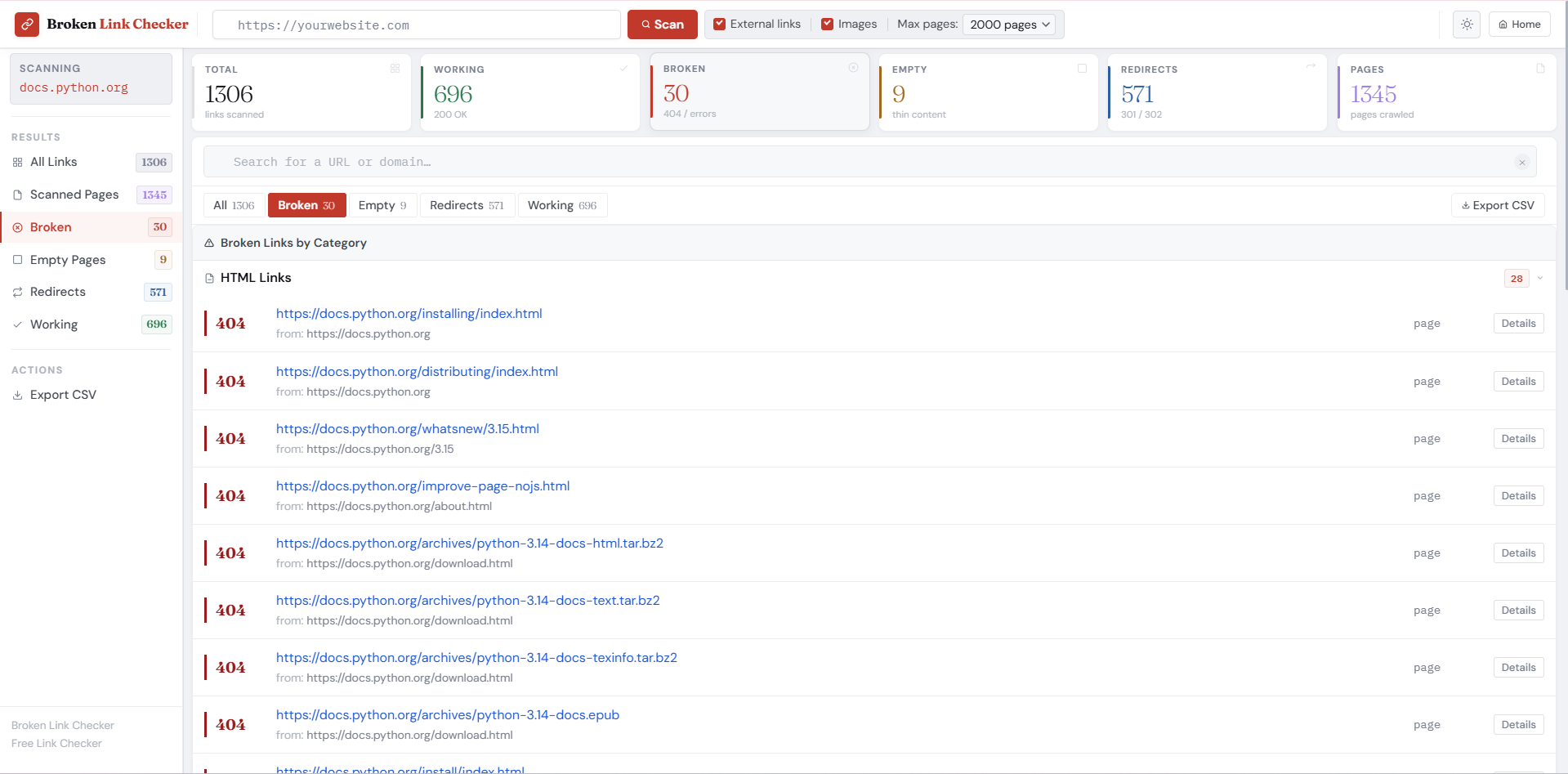
Broken Link Checker dashboard showing scan results with categorized broken, working, and redirected links
Dashboard

Your entire site's link health, at a glance

Scan thousands of pages and get a clear, categorized summary the moment the crawl finishes. No waiting for reports — results stream in live as every link is checked.
404 Broken 200 Working 301 Redirect Empty Pages
6 summary cards — total links, working, broken, empty, redirects, and pages crawled
One-click filtering — jump to any category from the sidebar or the stat cards
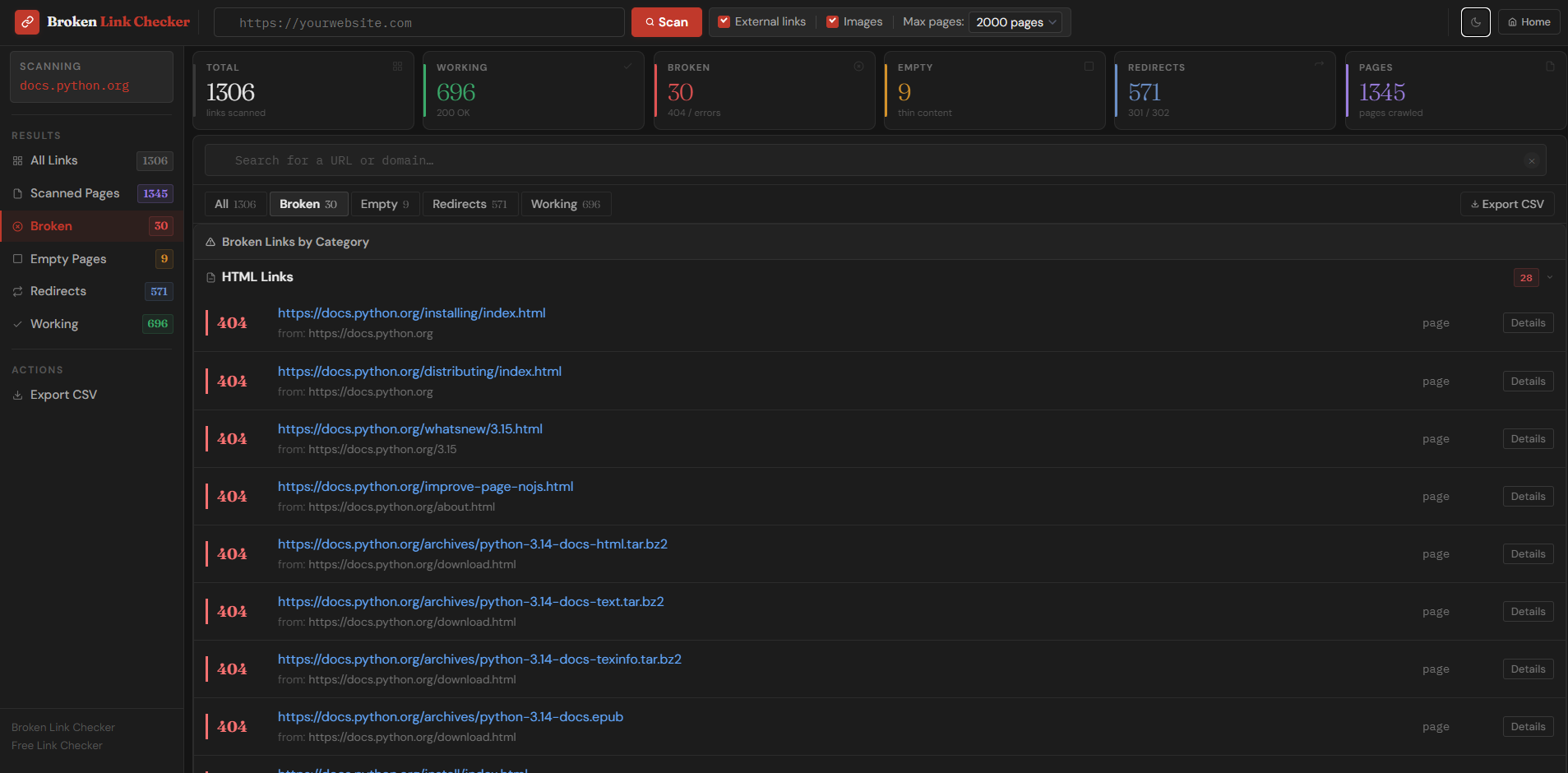
Light & dark mode — scans comfortably day or night
Broken Link Checker dark mode showing broken links grouped by HTML, CSS, JS, and image categories
Categorization

Broken links grouped by type & source

Instead of a flat list of URLs, broken links are automatically sorted by resource type — HTML pages, stylesheets, scripts, images, and fonts — so you know exactly what kind of problem you're dealing with.
HTTP status codes displayed directly inline — 404, 500, timeout, and more
Source page shown beneath every broken URL — know exactly which page has the bad link
Collapsible categories — expand or collapse HTML, CSS, JS, image, and font groups independently
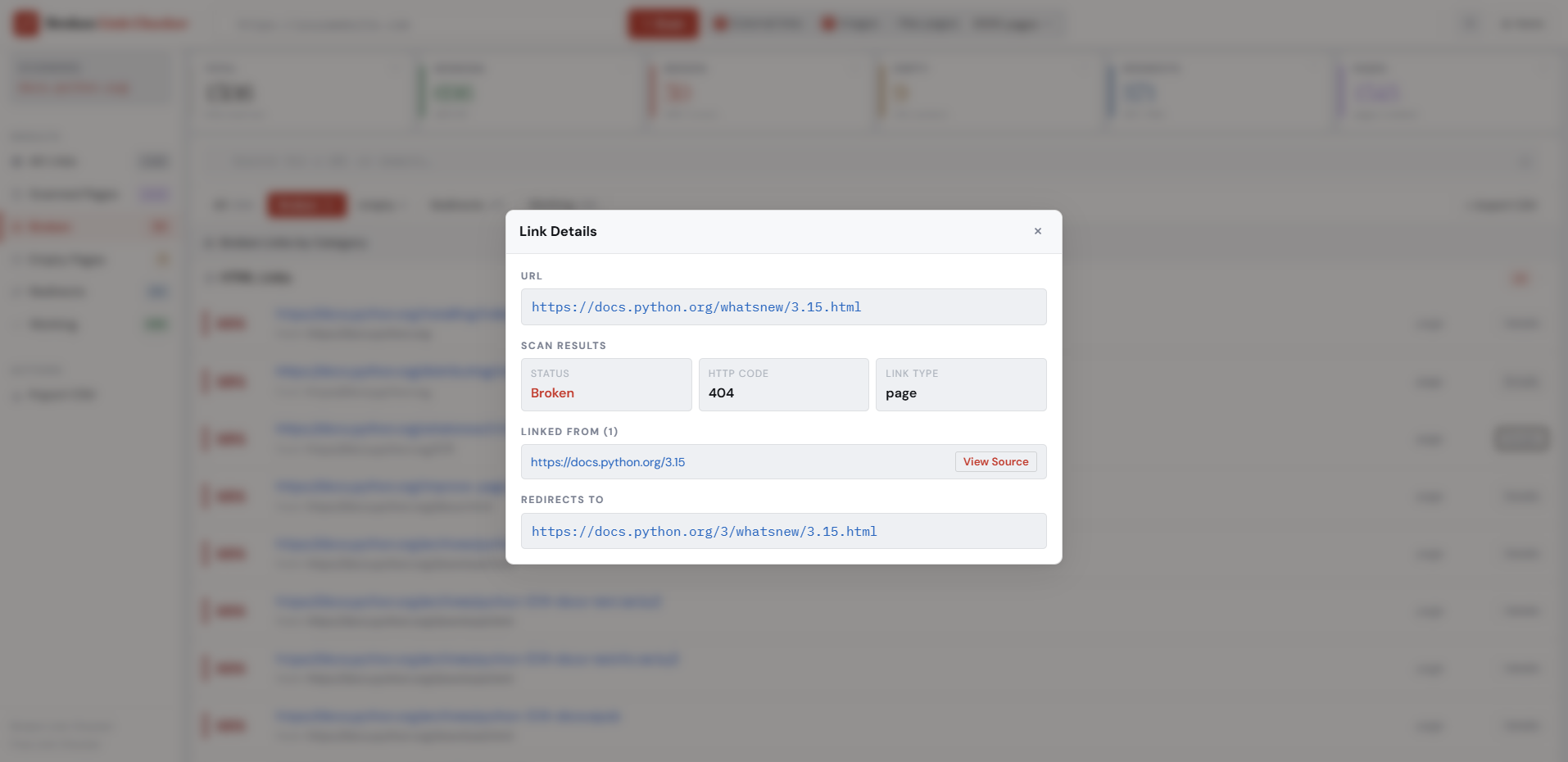
Link Details modal showing HTTP code 404, status Broken, linked from page, and redirect destination
Link Inspector

Deep-dive into every broken link

Click "Details" on any result to open a full inspection panel. See the exact HTTP response code, which pages link to it, what type of resource it is, and where it redirects — all without leaving the dashboard.
Full URL, HTTP code & link type — page, image, script, or stylesheet
"Linked from" list — every page on your site that contains this broken link
Redirect destination — see where the URL actually points so you can update the link directly
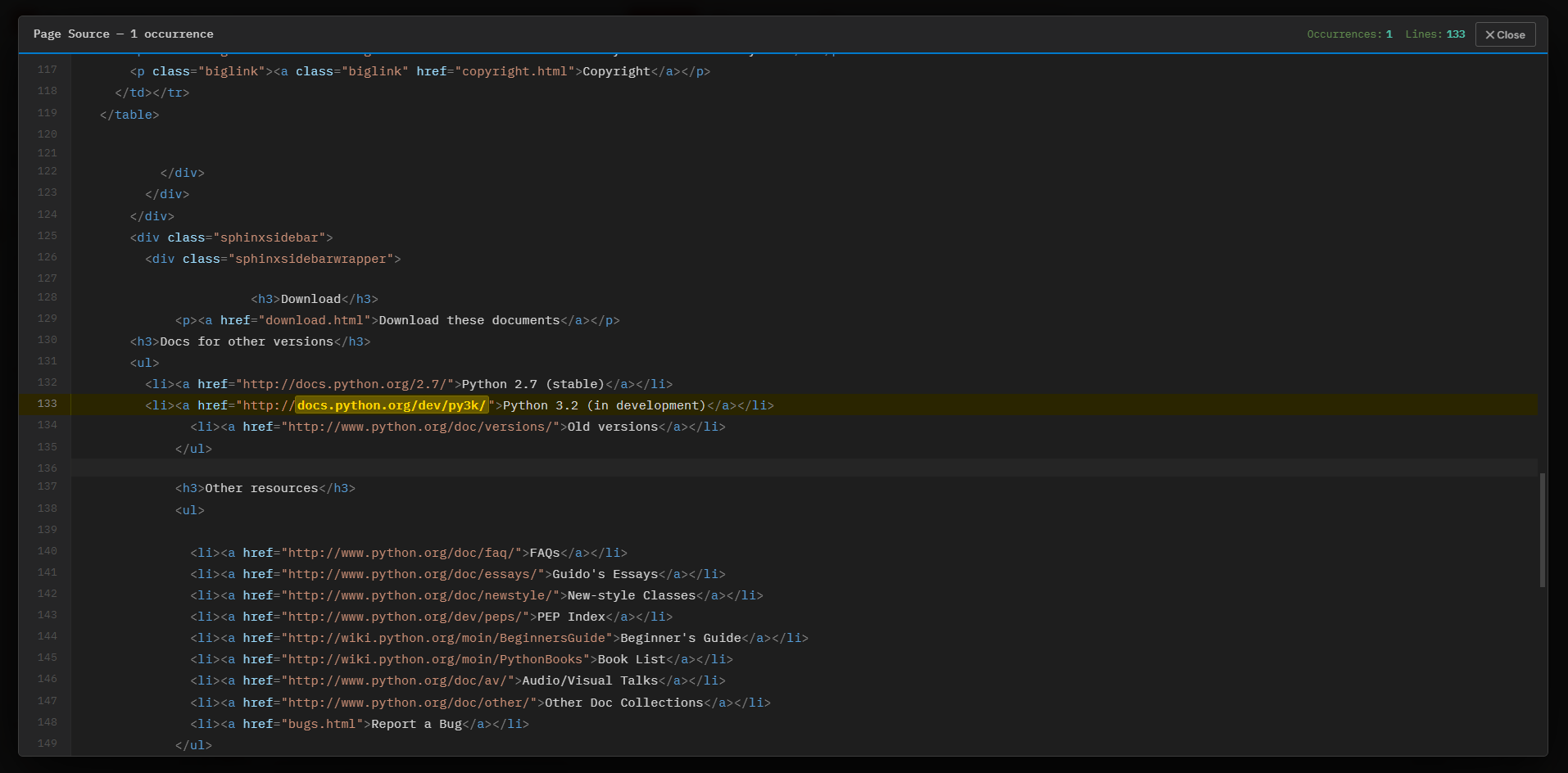
Page source viewer showing syntax-highlighted HTML with broken link highlighted in yellow on line 133
Source Viewer

Find the broken link in your actual code

Hit "View Source" to open a full VS Code–style source viewer. The exact line containing the broken link is highlighted in gold — no searching, no guessing.

Gold line highlight — the broken href is marked and the URL fragment is bolded within the line
Line numbers & occurrence count — know exactly where to look and how many times it appears
Full syntax highlighting — HTML, attributes, strings, and tags all colored for easy reading
What we detect

Every type of broken link, covered.

A comprehensive scan that goes far beyond simple 404 checking — we analyse every type of link and asset on your website.

Broken Internal Links

Every internal link pointing to a non-existent page. Most damaging for SEO — they break the link equity flow between your pages.

Broken External Links

Outbound links to dead external websites. Signals poor content maintenance to search engines and damages visitor trust.

Missing Images

Detects broken image src attributes — including files in subfolders, images with spaces in filenames, and relative paths.

Redirect Chains

Identifies URLs that redirect to other URLs. Excessive chains slow your site and dilute PageRank through internal links.

Empty & Thin Pages

Flags pages with very little text content. Google penalises thin content and lowers the quality score of your entire website.

CSS & JS Resources

Checks stylesheets and JavaScript files are loading correctly. Broken CSS breaks layouts; broken JS disables functionality.

Web Font Files

Verifies .woff, .woff2, .ttf and .eot font files are accessible. Missing fonts cause text to render in fallback fonts.

Open Graph & Meta URLs

Checks URLs in og:image, og:url, and other meta tags. Broken OG images make your pages look broken on social media.

Source Code Viewer

Click any broken link to see the exact line in your source HTML where it appears — highlighted and ready to fix.

Process

How it works in five steps.

Our crawler mimics a search engine bot to give you an accurate picture of what Googlebot actually sees.

1

Enter Your URL

Paste your website address and choose scan depth — up to 2000 pages.

2

Crawl & Discover

The crawler visits your homepage and follows every internal link it finds.

3

Check Every Link

Each URL is verified. Images, CSS, JS, and fonts checked in parallel batches.

4

Review Results

Results stream in real time. Filter by status, search by domain or URL.

5

Fix & Export

Use the source viewer to find the exact code line, then export a CSV report.

Reference

Understanding HTTP status codes.

Every link on your website returns a status code. Here's what each one means for your SEO and user experience.

200
OK — WorkingThe link is healthy and returns the expected page.
Positive
404
Not Found — BrokenPage doesn't exist. Wastes crawl budget and frustrates visitors.
Harmful
500
Server ErrorServer encountered an error. Repeated errors signal hosting problems.
Harmful
403
ForbiddenServer refuses the request. Often misconfigured file permissions.
Warning
301
Permanent RedirectURL has permanently moved. Each redirect wastes a small crawl budget.
Caution
302
Temporary RedirectTemporary redirect. Switch to 301 if the move has been permanent.
Caution
Empty PagePage loads (200) but has less than 200 characters of visible text.
Thin Content
0
Timeout / UnreachableServer took too long to respond or is completely offline.
Harmful
Use Cases

Who should use this tool.

Broken links cost you traffic, rankings, and revenue — whatever type of site you run.

E-commerce Stores

  • Find product image links that return 404
  • Detect deleted product pages still linked from navigation
  • Check category pages for broken filter links
  • Audit seasonal campaign pages after they expire
  • Verify payment and checkout page accessibility

Bloggers & Content Sites

  • Find old posts linking to deleted or moved pages
  • Check external resource links that have gone offline
  • Detect missing featured images across all posts
  • Identify thin content pages before a Google update
  • Clean up links before applying for AdSense approval

SEO Professionals

  • Run pre-launch technical audits for clients
  • Find crawl budget wasters from redirect chains
  • Identify broken backlink targets for reclamation
  • Audit after site migrations for link integrity
  • Generate client-ready reports with CSV export

Web Developers

  • Test staging sites before going live
  • Verify all assets load after a deployment
  • Check relative image paths in CMS templates
  • Debug broken CSS and JS file references
  • Validate font file paths after a CDN migration

Business Websites

  • Audit your site before a product launch or redesign
  • Find broken links on contact and services pages
  • Check case study and portfolio pages regularly
  • Monitor partner and affiliate link health
  • Verify press release and media kit URLs are active

Educational Sites

  • Check reference and citation links stay valid
  • Find orphaned resource pages with no inbound links
  • Verify downloadable PDF and document links
  • Monitor lesson and course page availability
  • Keep resource library links up to date
FAQ

Frequently asked questions.

How many pages can I scan for free?

You can scan up to 2000 pages per scan, completely free with no sign-up required. Run as many scans as you like. Choose your depth from the dropdown: 1, 25, 50, 100, 200, 500, 1000, or 2000 pages.

Will scanning my website affect its performance?

Our crawler includes a small delay between requests (50ms) and uses parallel checking for non-page resources to minimise server load. For most websites the scan is unnoticeable. Consider running scans during off-peak hours if you have a resource-constrained server.

Why is a link showing as 404 when it works in my browser?

This can happen if the URL contains spaces or special characters that browsers encode automatically, the page requires a login or session cookie, or the server blocks requests without a browser-like User-Agent. Our checker sends a standard browser User-Agent to mitigate most of these issues.

What is an "empty page" and should I fix it?

An empty page loads successfully (HTTP 200) but has less than 200 characters of visible text after stripping HTML. Google considers these "thin content," which can lower your site's overall quality score. Add meaningful content or redirect these pages to a more relevant destination.

What does the Source button do in the results?

Clicking "Source" fetches and displays the HTML source code of the page containing the broken link. The exact line where it appears is highlighted in yellow so you can immediately find and fix it in your template or CMS.

How often should I run a link check?

For active websites that publish content regularly, once a month is a good baseline. Run additional scans after publishing large content batches, performing site migrations, changing your URL structure, or updating your CMS. E-commerce sites benefit from weekly checks.

Does this tool check JavaScript-rendered content?

No — like Googlebot's primary crawler, our tool checks the raw HTML returned by the server before JavaScript executes. Links only inserted by JavaScript (via React, Vue, Angular etc.) won't be detected. This accurately reflects what Googlebot sees for raw-HTML SEO purposes.

Ready to fix your broken links?

Enter your website URL above and get a full broken link report in minutes — completely free, no sign-up required.